Integration Architecture
This page describes how a third-party integration platform exchanges data with DidYouGo. The client's integration platform owns and pushes client address, tag, and scheduling master data into DidYouGo. DidYouGo is the system of record for on-the-ground service delivery — check-in, check-out, and delivery confirmation are captured natively in the DidYouGo and are not exposed as write endpoints to any external system. The only data DidYouGo returns is a read-only feed of service confirmation records, used for reporting and reconciliation.
The Big Four Data Flows
| # | Flow | Direction | Primary endpoint(s) | Data moved |
|---|---|---|---|---|
| 1 | QR Code Addresses | Integration Platform → DidYouGo | POST / PATCH /api/qrcodes (+ bulk) |
Physical site / client-home address, geocoded lat-long, address type (SITE or CLIENT_HOME) |
| 2 | QR Code Tags | Integration Platform → DidYouGo | POST / PATCH /api/qrcode-tags (+ bulk) |
Client reference data attached to an address: internal name, unique client number, display label, tag type (SITE or CLIENT) |
| 3 | Appointment Schedules | Integration Platform → DidYouGo | POST /api/appointment_schedule/bulk |
Service bookings: client tag + address, service, date / time, duration, external job reference |
| 4 | Service Confirmations | DidYouGo → Integration Platform (read only) | GET /api/service-confirmations |
Check-in / check-out / delivery status, timestamps, location-verified flag — visit evidence for reconciliation |
How Data Moves
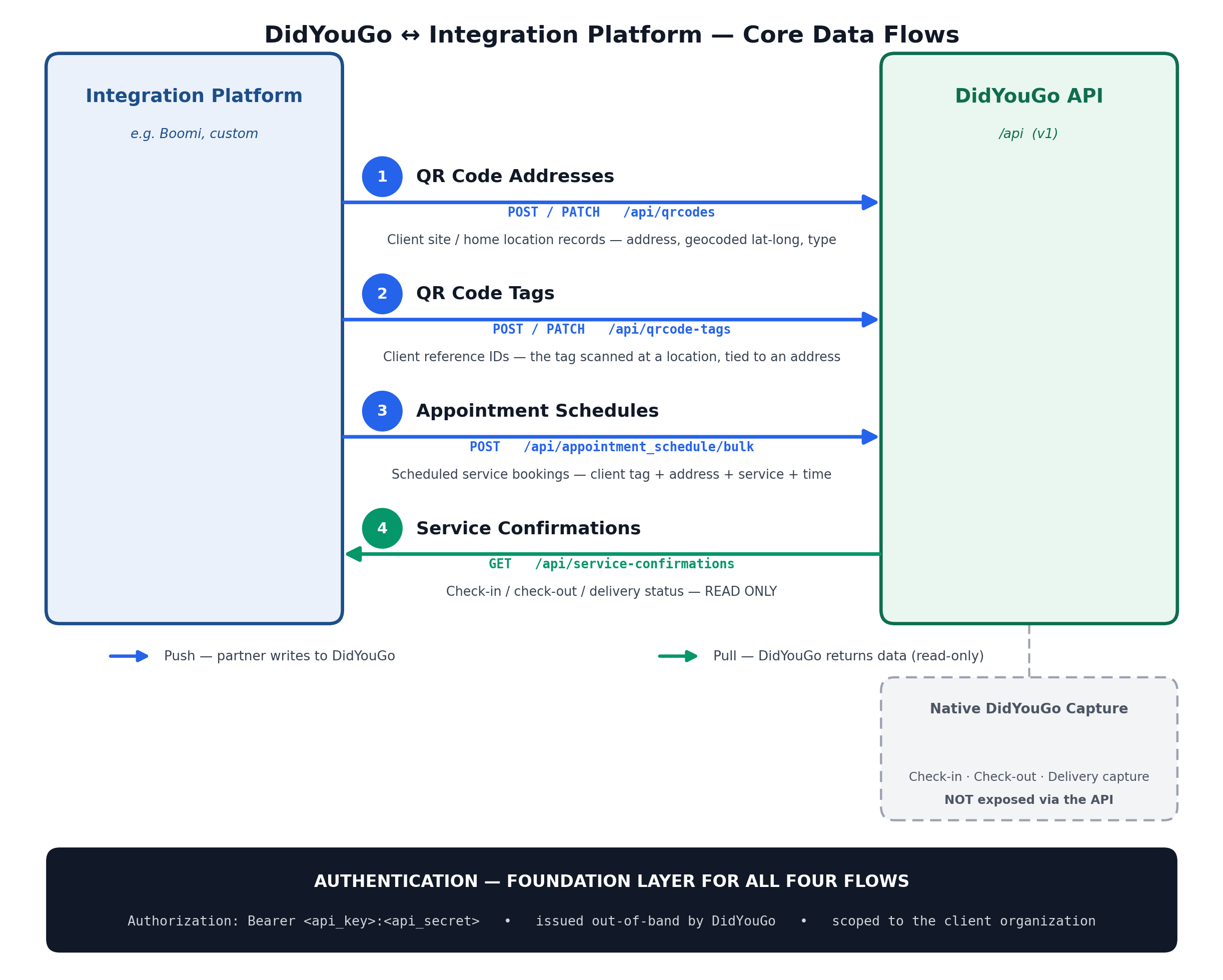
1. QR Code Addresses
Direction: Integration Platform → DidYouGo
POST / PATCH
/api/qrcodes — plus bulk import via POST /api/qrcodes/bulk.
Pushes a physical site or client-home address into DidYouGo. Each address is stored with a geocoded
latitude / longitude pair and an address type of SITE or CLIENT_HOME.
See the QR Code Addresses reference for field-level detail.
2. QR Code Tags
Direction: Integration Platform → DidYouGo
POST / PATCH
/api/qrcode-tags — plus bulk import via POST /api/qrcode-tags/bulk.
Client reference data attached to an address: an internal name, a unique client
number, a display label, and a tag type of SITE or CLIENT.
See the QR Code Tags reference for field-level detail.
3. Appointment Schedules
Direction: Integration Platform → DidYouGo
POST /api/appointment_schedule/bulk
Service bookings built from a client tag + address pair, plus the service, date / time, duration, and an external job reference the client's platform can reconcile against.
See the Appointments reference for field-level detail.
4. Service Confirmations
Direction: DidYouGo → Integration Platform (read only)
GET /api/service-confirmations
Check-in, check-out, and delivery events captured in the DidYouGo — not exposed as write endpoints to any external system. This feed is the only data DidYouGo returns: visit evidence (status, timestamps, location-verified flag) for reporting and reconciliation.
GET /api/service-confirmations.
DidYouGo also supports push-based webhooks for service-confirmation events — see
Webhooks.
Sync vs Background Processing
Flows 1–3 support both a synchronous bulk-import mode (result returned inline — best for
small batches) and a background mode (immediate 202 response with a task UUID
to poll — best for large batches). Both modes run identical import logic; only result timing differs.
| Sync | Background | |
|---|---|---|
| Response | 200 with the full result inline |
202 with a background_task_uuid to poll |
| Best for | Small payloads, quick imports, callbacks that need the result now | Large files / uploads, imports that can take minutes |
See Background Processing for the full polling walkthrough.
Authentication Foundation
Every call across all four flows authenticates the same way — a single Bearer credential pair, issued directly by the DidYouGo team. There is nothing else an integration partner needs to implement to talk to DidYouGo.
Authorization: Bearer <api_key>:<api_secret>
| Credential source | Issued out-of-band by the DidYouGo team — no self-service signup, no OAuth handshake |
| Optional scoping | X-API-SCOPE header restricts a request to a specific organization UUID |
| Roles (server-side) | SUPER_ADMIN, PARTNER_ADMIN, PROVIDER_ADMIN, WORKER — the issued key inherits a role's permissions |
| Auth errors | 401 missing / invalid credentials · 403 authenticated but insufficient role, or a subscription-gated endpoint |
| Rate limit | 300 requests / minute and 10 requests / second, per client IP, across all endpoints |
A second scheme — HMAC request signing — exists in the API but is used exclusively by DidYouGo's own check-in flow, which is not part of this integration. Integration developers only need to implement the Bearer scheme above.
See Authentication and Errors & Rate Limits.